![IncQuery logo 2022 (horizontal)-1.png]](https://www.incquery.com/hs-fs/hubfs/IncQuery%20logo%202022%20(horizontal)-1.png?height=39&name=IncQuery%20logo%202022%20(horizontal)-1.png)
As discussed in the article "Export to word", you are able to generate a fully annotated word doc with clear instructions of the logic set up by clicking on the "Export to word" tab.
 |
This generated word doc will contain all of the coded simple and complex logic that are set up in the latest version of the survey you are working on.
However, it is possible to customize and/or output these instructions in the word doc with placeholder logic before any coding is even implemented - allowing you to generate client ready word doc late in the evenings or before the IncQuery team on your project is assigned.
How to do this?
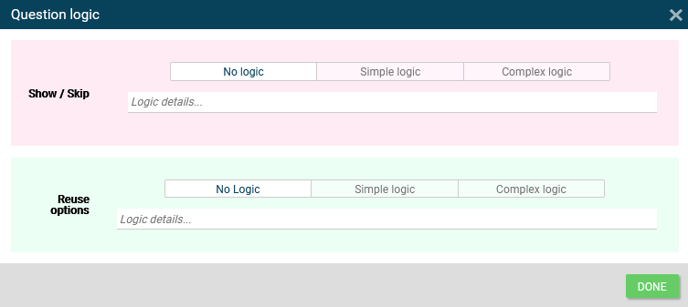
Throughout various points on the platform, there are text input blanks labels as "Logic details..". Typically, these blanks are reserved for the IncQuery team to describe any complex logic that was coded for the question/option and these logic details are reflected in the word doc.
Example: Question Box - "Logic"
 |
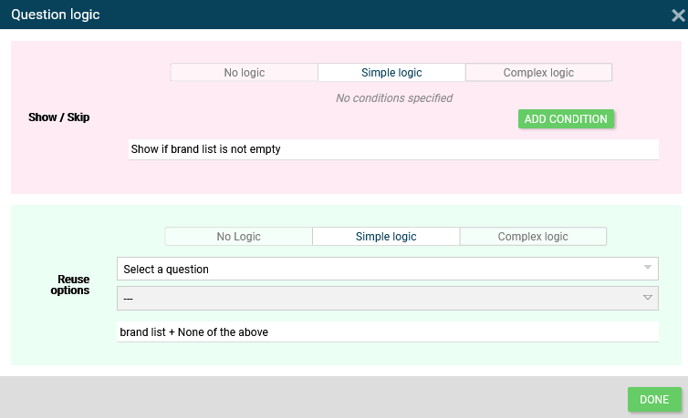
To create your own placeholder "logic details..", you simply have to activate simple logic and fill up "Logic details.." with your required instructions (no need to code it out as the purpose is to generate a document for initial review).
Note: Filling in the "Logic details.." does not mean it is coded. Make sure to leave a comment for the IncQuery team to implement the instructions once confirmed.
 |
Below is what the question will look like after the instruction is added:
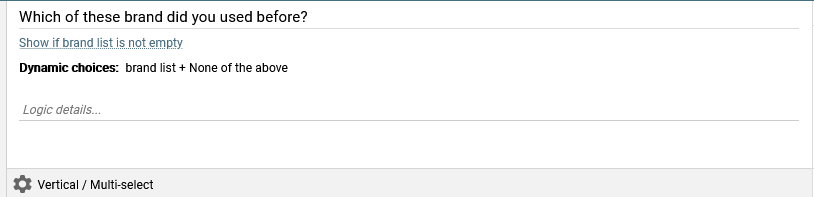 |
Warning: Notice that the simple logic condition that is usually auto-generated, has been overwritten by the text in "Logic details..". This can lead to erroneous simple logic being "hidden" so it is best to remove these placeholder logic details once the IncQuery team is looped in to support your project.
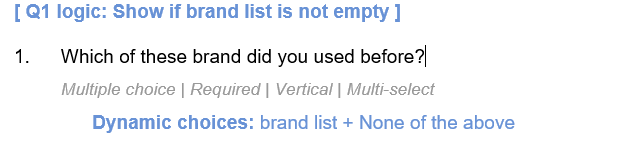
The question details in word doc after the edit:
 |
Once all the placeholder logic details are in place, you can download the annotated word doc for a more fruitful internal review/iteration with your manager or client.
Tip: Starting the survey drafting process on the IncQuery platform instead of MS words gives you access to the various function that are purpose built for creating surveys faster, easier and better.