![IncQuery logo 2022 (horizontal)-1.png]](https://www.incquery.com/hs-fs/hubfs/IncQuery%20logo%202022%20(horizontal)-1.png?height=39&name=IncQuery%20logo%202022%20(horizontal)-1.png)
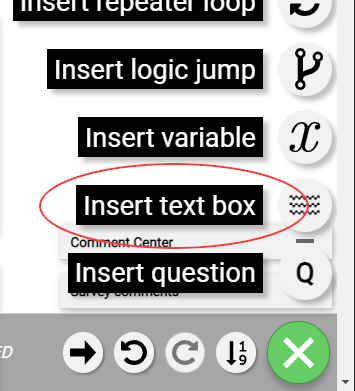
Adding text to a survey is done for various reasons including providing instructions, thank you messages, explaining upcoming questions, providing definitions, etc. The text box element is added from the Insert Menu:
 |
There are 3 different types of Text boxes:
Text for respondents - This text box type is the only one of the three that are shown to respondents. Note when you click into the text box a pop-up menu will appear allowing you to set bold, italicized, underlined text or dynamic text as well as add a bulleted list or a numbered list.
 |
Coder instructions - This text box will allow you another place to provide instructions to the IncQuery team. Note: As instructions are completed your Survey Directors might delete the instruction text box
 |
Note to reader - This text box allows you a place to provide further context or notes for internal readers of the survey document such as your coworkers, manager, or client.
 |