![IncQuery logo 2022 (horizontal)-1.png]](https://www.incquery.com/hs-fs/hubfs/IncQuery%20logo%202022%20(horizontal)-1.png?height=39&name=IncQuery%20logo%202022%20(horizontal)-1.png)
Things to consider when testing
- Proofreading - Are the questions free of typos and are they worded properly? Are vendor names spelled correctly?
- MECE principle (mutually exclusive and collectively exhaustive) - are the choices for your questions non-overlapping and do they cover all the possibilities?
- Length of Interview (LOI) - What is the overall time commitment to complete the survey? Note there may increase costs from panel vendors for long surveys.
- Content - Have you included all of the questions to get the data you need for analysis?
- Fatigue - Are the questions too repetitive? Best practice to limit loops to 3-5 iterations to avoid fatigue?
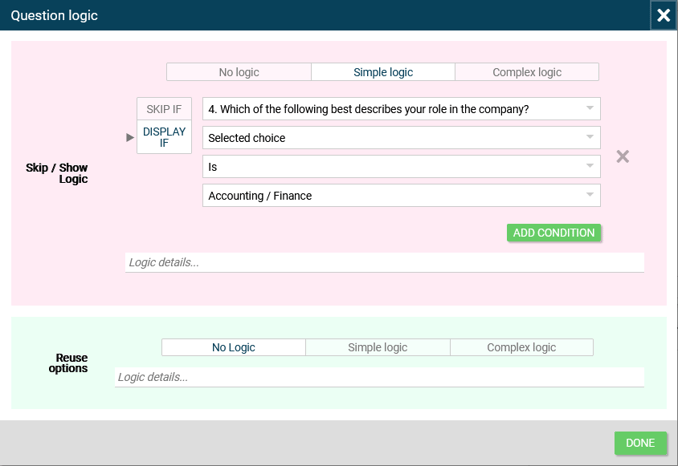
- Logic - Are the correct questions showing or skipping for the correct respondents? The IncQuery team will help set up logic but the intent isn't always clear. For example, here is a Simple logic dialog box.
 |
Methods for Testing
The Preview tab is where you can test out the survey at any point. Testing is going to depend a lot on the setup of your survey. Does the survey have multiple pathways, if so how are they defined? Creating a survey schematic would help with this type of survey to ensure the respondents are getting routed appropriately.
Here are a couple of basic techniques you can utilize when testing:
- Ideal respondent - Here you answer as if you are the best fit for the survey, maybe a CEO with ultimate decision-making authority who is a current user of your highest priority vendor. Test through answering from this perspective.
- Low information respondent - The other end of the spectrum from "Ideal respondent" is the respondent who barely qualifies. This might be an individual contributor who only influences the decision-making. This type of respondent would pick "None of the above" or "I don't know" for a lot of questions.
- All the Options - Test as a respondent who picks all possible choices in a multi-select including and excluding a write-in value for "Other". Testing this way will help determine if prioritization logic is working if you have any setup.
- Fewest Options - Testing through picking the absolute minimum number of choices, for example only being familiar with a single vendor from an awareness question.
By utilizing these techniques above you can look for errors in the logic or in the code.
Errors and Page ID
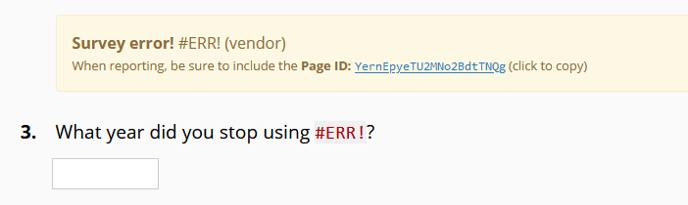
Here are some examples of errors messages in the survey Preview:
 |
 |
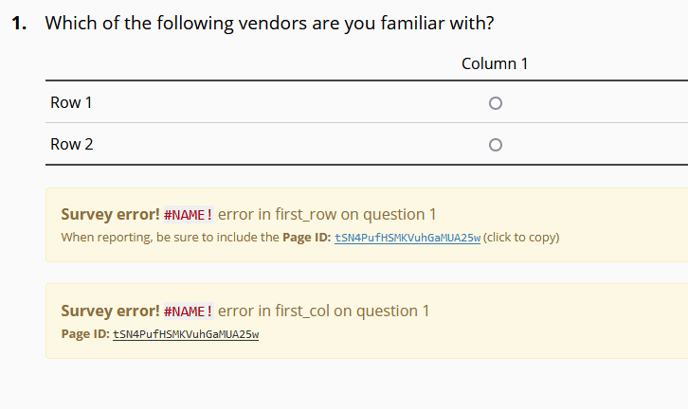 |
When a coding error like the ones above are spotted please share the Page ID with your coding team. This will help them find and fix the issue. Note the link provided to easily copy the ID to your clipboard.