![IncQuery logo 2022 (horizontal)-1.png]](https://www.incquery.com/hs-fs/hubfs/IncQuery%20logo%202022%20(horizontal)-1.png?height=39&name=IncQuery%20logo%202022%20(horizontal)-1.png)
 |
Overview tab
- Project Name - At the very top of the Overview tab is the Project Name establish when the survey was created. It can be edited here. To avoid confusion we recommend minimal edits to the Project Name
- Sample Size (required) - Here is where we set the overall Target N (number of survey respondents) and the Max N. The survey will be automatically paused when the Max N is reached and not allow any additional respondents to start
- Quotas (optional) - We can set up quotas for tracking or capping purposes
- Objective (optional) - Note field for inputting the project objective
- Target population (required) - Radio button with three option Consumer (B2C), B2B or Internal employees. Pick the choice that most closely aligns with your survey and provide additional details if necessary
- Fielding geography (required) - Series of 5 dropdown menu where the fielding geography is selected. Please pick each country the survey will be fielded in.
- Industry of product or service (required) - From the dropdown menus please select the industry or service that best describes the surveys subject.
- Notes (optional) - catch-all notes field for anything that does not fit in the above categories
SECTIONS - The bottom half of the Overview tab has an overview of the sections in the survey
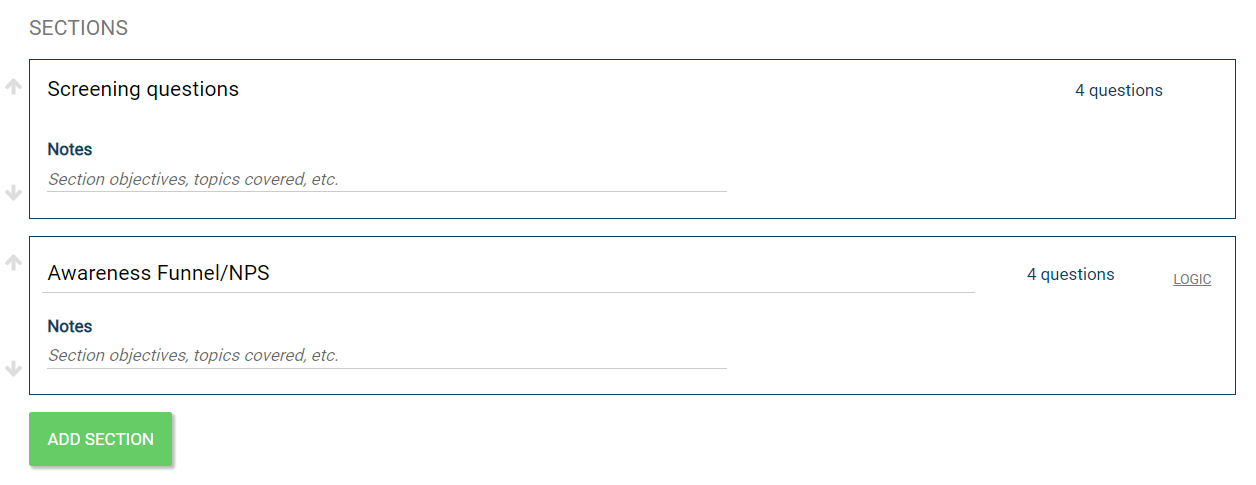 |
From this area you can add, move, rename, or set logic on sections. Note all of this functionality is available on the Content tab as well.