![IncQuery logo 2022 (horizontal)-1.png]](https://www.incquery.com/hs-fs/hubfs/IncQuery%20logo%202022%20(horizontal)-1.png?height=39&name=IncQuery%20logo%202022%20(horizontal)-1.png)
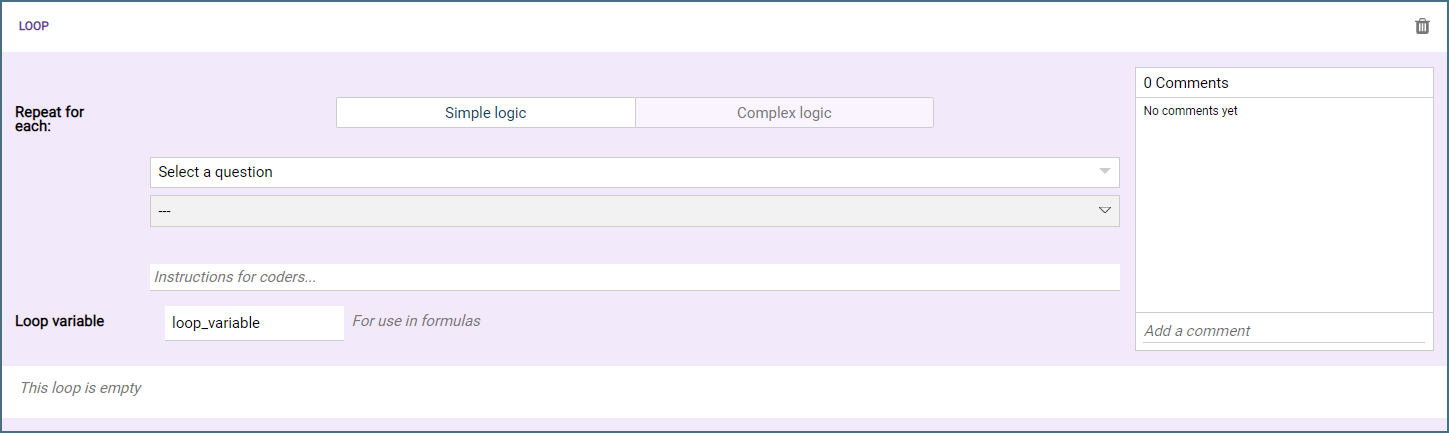
Looping a question over some type of list is a common structure in our surveys. To perform this task in IncQuery we utilize a Repeater Loop, here's an empty Repeater Loop:
 |
The Repeater Loop can be added from the Insert Menu. Once added questions can be clicked and dragged inside of it or added directly to it.
The Repeater Loop has 4 parts to it:
Repeat for each - This defines what the loop will iterate over. Most often this is a variable setup with Complex logic but it is also possible to base a loop on Simple logic.
Loop variable - Some examples of loop variables include vendors, brands, timeframes, products. It is important to include the loop variable in each question so that the data output is clear.
Loop Body - This is the block inside the loop where the questions are placed. A single question can be looped or almost an entire survey.
Comment thread - Here you can leave notes, comments, questions, or instructions for your colleagues or the IncQuery team.
Note: A loop can not span over a section split. To organize questions inside the loop you can use a grouping block instead