![IncQuery logo 2022 (horizontal)-1.png]](https://www.incquery.com/hs-fs/hubfs/IncQuery%20logo%202022%20(horizontal)-1.png?height=39&name=IncQuery%20logo%202022%20(horizontal)-1.png)
Crosscuts (aka cross tabulation) are a powerful feature of IncQuery’s analysis tool that allows you to identify patterns or trends within your survey data based on any two (or more) variables.
Once data collections starts on the Downloads tab you will find IncQuery's Analysis Tool module. The Cross Cuts section of this module will allow combinations of questions and variables to cut the data against. In the example below we are looking at how awareness changes with age:
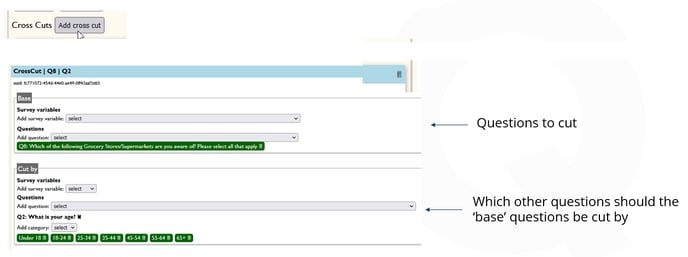 |
To add Cross cuts you start by clicking the Add cross cut button, then you add a Base question to cut. Here it's: Q8 Which of the follow Grocery Stores/Supermarkets are you aware of? Please select all that apply
Then we add another question or a variable to cut the Base question against in the "Cut by" section. In this example we use Q2 What is your age?
Once all your cross cuts are set up you can Build the analysis file and then Download it.