![IncQuery logo 2022 (horizontal)-1.png]](https://www.incquery.com/hs-fs/hubfs/IncQuery%20logo%202022%20(horizontal)-1.png?height=39&name=IncQuery%20logo%202022%20(horizontal)-1.png)
 |
Content tab
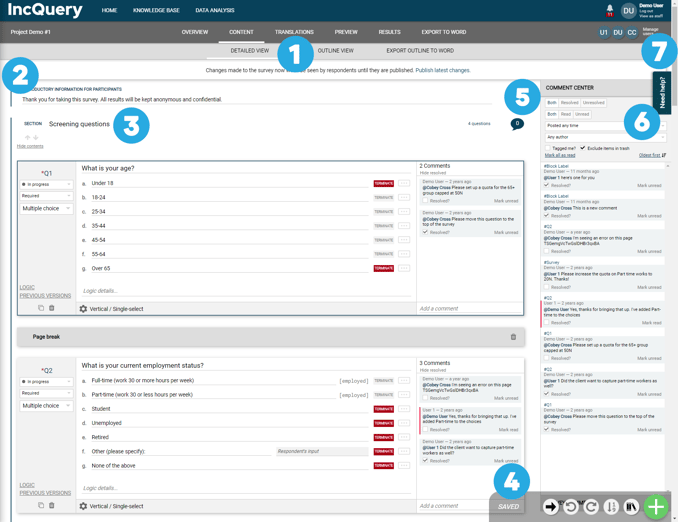 |
#1 Toggle between Detailed View (default) and Outline View
#2 Introduction for participants (aka respondents)
#3 Screening section - This is always the first section and can not be moved
#4 Content Toolbar - Go to question, Redo, Undo, Renumber, Insert Modules, and Insert Menu (for more details see the Content Toolbar article)
#5 Comment Center - a centralized location for question comments (see article on Comment Center for more details)
#6 Resource Center - an expandable menu that will provide assistance and in-app walkthroughs
#7 Manage Users - button used to add people to the survey. Add anyone who should have edit capabilities on the survey
Keyboard Shortcuts
CTRL + G - 'Go to question' search dialog
CTRL + M - Insert a new question
CTRL + P - Insert a page break
CTRL + J - Insert a new logic jump