![IncQuery logo 2022 (horizontal)-1.png]](https://www.incquery.com/hs-fs/hubfs/IncQuery%20logo%202022%20(horizontal)-1.png?height=39&name=IncQuery%20logo%202022%20(horizontal)-1.png)
After you have created a survey, the process of Authoring begins. You may be working from a blank survey, a template, or a copy of an existing survey. Regardless of your starting point authoring the survey directly on IncQuery saves time. Unlike popular word processing programs, IncQuery is purpose-built for creating surveys so the tools you need are readily available.
The IncQuery platform is intended to be a collaborative space where you and your team can communicate and create the survey together. One thing you will want to do early in the process is add your coauthors to the survey using the Manage Users button at the top right inside of the survey.
From the insert menu you can add in Questions, Variables, Text boxes, Repeater loops, Grouping Blocks, Page Breaks, and Section Splits. Add in as much as you would like, in the next phase (Testing/Revising) we will perfect the content.
Some specifics on Authoring
The first section in the survey is always the Screening section, this is where you will funnel the respondents to get to your target audience for this particular study. IncQuery has several tools in place to help with that funneling. There's a lot to consider when writing the Screening section check out this article for more details: Click here.
Here's an example of a typical screening question:
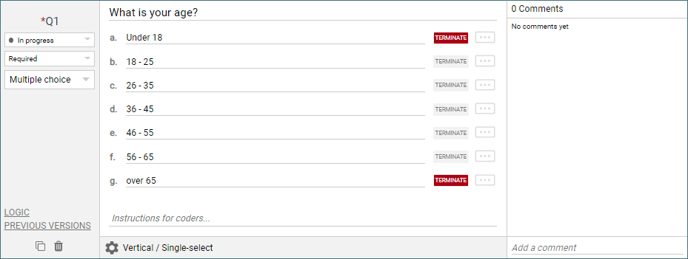 |
Another thing to notice in the image above is the Comment thread. Each question has its own comment thread where you can @ mention anyone added to the survey with comments, questions, or instructions. This is a popular way to leave coder instructions to your IncQuery team.