![IncQuery logo 2022 (horizontal)-1.png]](https://www.incquery.com/hs-fs/hubfs/IncQuery%20logo%202022%20(horizontal)-1.png?height=39&name=IncQuery%20logo%202022%20(horizontal)-1.png)
Reaching statistical significance is important in your dataset because it enables you to draw accurate conclusions. To reach it there are going to be minimum N values you will need to achieve in fielding the survey. Those minimum values are the goal line for panels to reach when sending out the survey.
We accomplish minimum quotas in IncQuery but setting caps on people who DO NOT qualify for the quota we're attempting to fill. Let's walk through an example. Here we have two quotas:
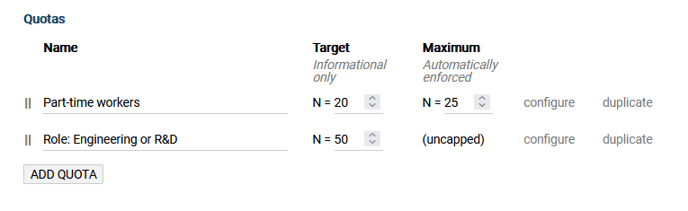 |
The minimum N we need for Engineering or R&D roles is 50N. Now let’s imagine that we are midway through fielding, but we have only reached 15N for the quota Role: Engineering or R&D. To boost the N for this group one technique we can use is to cap all other roles. Creating a new quota that will count those NOT in the Engineering or R&D, then capping that new quota will result in only Engineering and R&D being able to qualify for the survey.
Here's what that would look like on the Results tab:
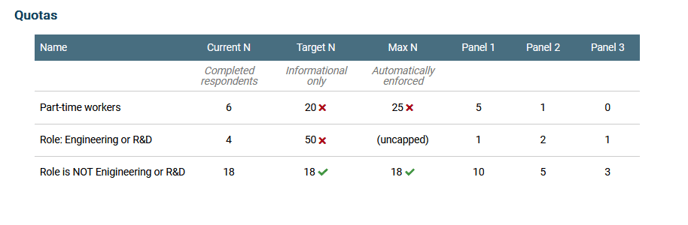 |
Once this cap is in place the panels can send out lots of invites to the survey but only Engineering and R&D will be permitted to qualify.
When quotas are based on multi-select questions there’s a bit more complexity to consider. We cover that in this article: Quota Considerations
Ask your IncQuery Survey Directors for assistance in setting up minimum quotas