![IncQuery logo 2022 (horizontal)-1.png]](https://www.incquery.com/hs-fs/hubfs/IncQuery%20logo%202022%20(horizontal)-1.png?height=39&name=IncQuery%20logo%202022%20(horizontal)-1.png)
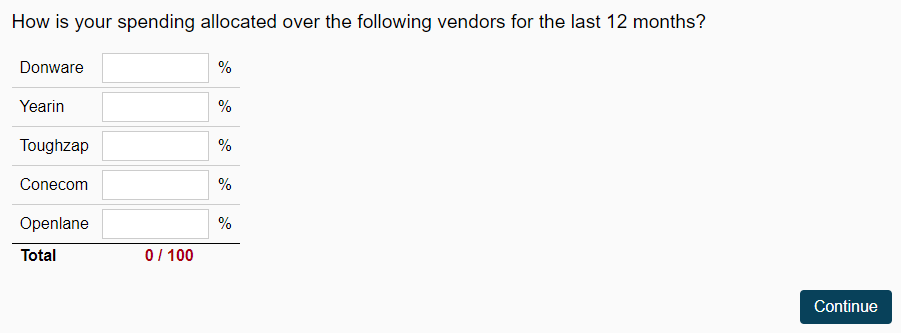
The Allocation question type will give the respondents a column of number input fields that are required to sum to Total. This is most often used for percentage allocations like this one for spend:
 |
The default setting on an Allocation is nothing (the two available settings are turned off):
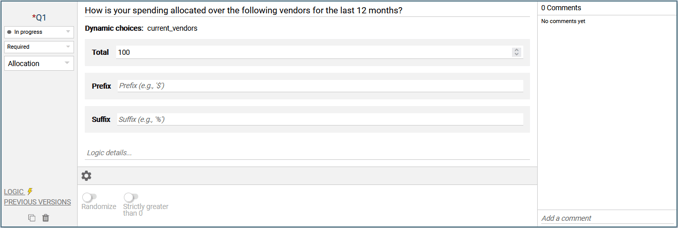 |
The total is set to 100 and suffix is % by default and both can be changed in the body of the question.
Randomize - This setting will shuffle the display of the choices, when enabled with No logic setting for the choice pins will appear to allow for locking choices into place.
Strictly positive - This setting will enforce that each choice is given a value of 1 or greater. Be mindful with this setting and ensure zero is not a proper answer or else it will force your respondent into an incorrect statement.
Logic Settings for Allocation
The available logic settings for an Allocation question are:
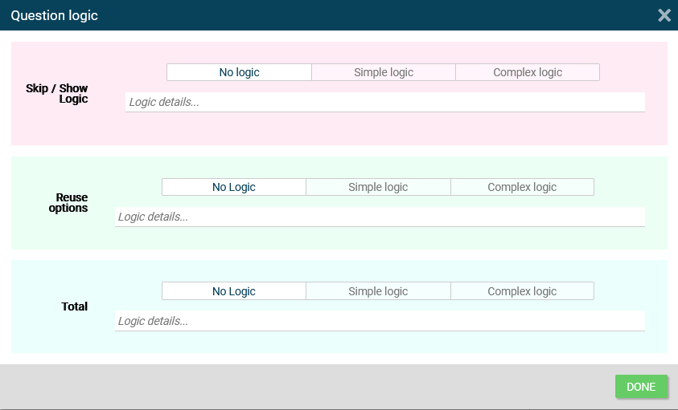 |
Show/Skip - dictated which respondents see or do not see this question
Reuse options - Pull in information from a previous question or from a variable to populate the choices
Total - Dynamically calculate the total for which the Allocation will sum based on Simple or Complex logic